
Bloom
Bloom adds a soft, radiant glow that spreads outward from the brightest areas of your photo. It creates a luminous, almost magical atmosphere by making light sources and highlights appear to softly bleed into surrounding areas.
When Light Takes on a Life of Its Own
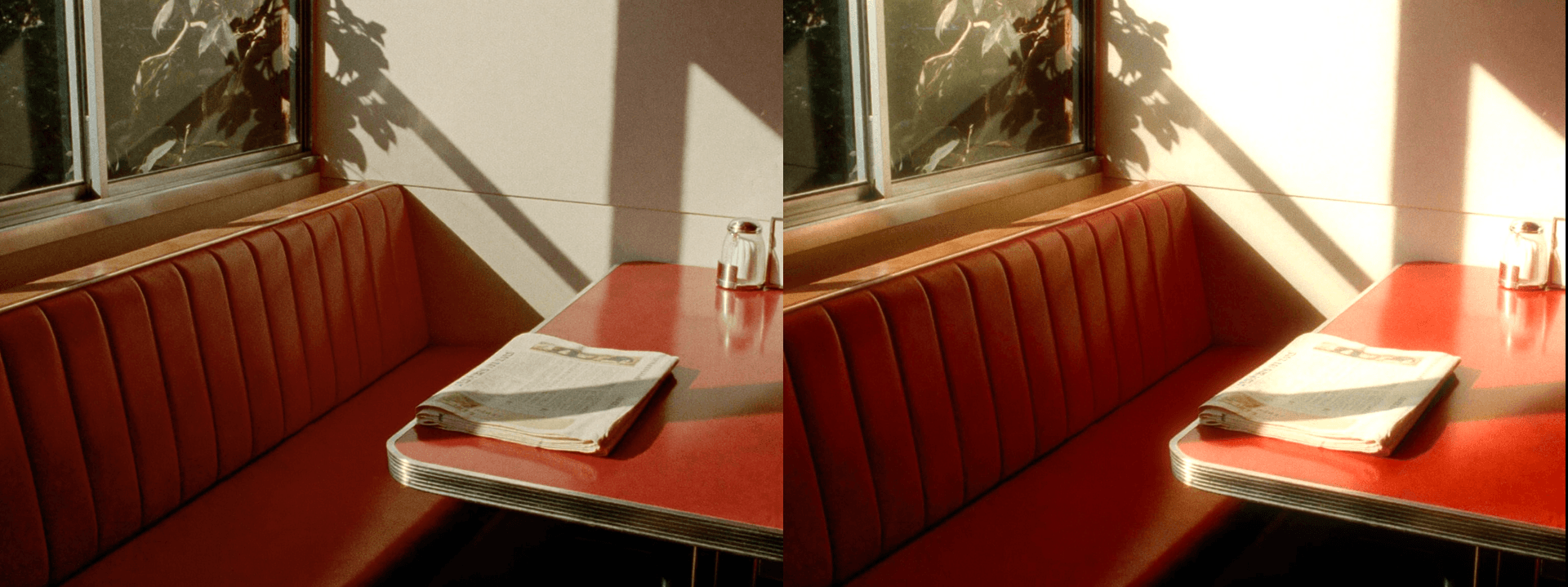
Bloom takes the brightest parts of your photo and lets them breathe — softening their edges and allowing light to spill outward in a gentle, radiant glow that feels organic rather than applied. It's not about adding brightness so much as giving existing light a sense of presence, atmosphere, and emotional weight, as if the scene itself is quietly glowing from within. The effect originated in optical physics: when a lens is slightly overloaded with light, the brightest areas begin to bleed into their surroundings, creating a soft halo that reduces sharpness but increases feeling. In digital editing, bloom recreates that optical phenomenon intentionally — taking what was once a limitation of early lenses and turning it into one of the most sought-after aesthetic qualities in modern photo editing.
Made for Golden Hour and Backlit Moments

Bloom is especially powerful in backlit portraits, golden hour landscapes, sunset silhouettes, and any scene where a light source sits directly within or just outside the frame. In these moments, bloom transforms an ordinary highlight into something luminous and alive — the sun becomes a soft burst of warmth rather than a harsh white point, and the edges of a backlit subject glow with a gentle, diffused radiance that draws the viewer deeper into the image. It's equally effective in indoor scenes with window light, candlelit environments, or any setting where practical light sources create natural pockets of brightness. In each of these contexts, bloom adds a cinematic softness that feels both intentional and entirely natural, as if the camera itself was responding to the beauty of the light rather than simply recording it.
Beautiful, But Easy to Overdo

Applied lightly, bloom elevates a photo into something that feels almost too beautiful to be real — the kind of image that stops a viewer mid-scroll and makes them look twice. But pushed too far, it risks swallowing the very detail and tonal structure that gives the effect its magic. Highlights lose their definition, edges dissolve into indistinct softness, and the image begins to feel hazy rather than luminous. A reliable approach is to apply bloom gradually and evaluate it against the unedited version frequently — the difference between a compelling bloom and an overdone one is often just a few percentage points. Bloom also interacts with other light-based effects like halation and soft light, so if you're layering multiple effects, reduce each one individually to keep the cumulative result from becoming overwhelming. When in doubt, pull back — the most effective bloom is the kind that makes a photo feel touched by light, not consumed by it.


